Kreu
Rreth Nesh
Spoonbill
Menaxhimi i Hotelit
Menaxhimi i Bar-Restorantit
Menaxhimi i Eventeve
Menaxhimi i Plazhit
Spoonbill HR
Spoonbill CRM – Sistem Menaxhimi i Dërgesave dhe Logjistikës.
Qëndra e Mbështetjes
Na kontaktoni
Blogu
Menu
Kreu
Rreth Nesh
Spoonbill
Menaxhimi i Hotelit
Menaxhimi i Bar-Restorantit
Menaxhimi i Eventeve
Menaxhimi i Plazhit
Spoonbill HR
Spoonbill CRM – Sistem Menaxhimi i Dërgesave dhe Logjistikës.
Qëndra e Mbështetjes
Na kontaktoni
Blogu
Apply
View Categories
Home
Docs
Point of Sales
How to filter purchases in Spoonbill PoS.
How to filter purchases in Spoonbill PoS.
< 1 min read
Listen
0:00
/
0:15
1×
Copy page
Copy page
Copy this page as Markdown for LLMs
View as Markdown
Open this page as plain Markdown
(opens in a new tab)
Open in ChatGPT
Ask questions about this page
(opens in a new tab)
Open in Claude
Ask questions about this page
(opens in a new tab)
Open in Google AI Studio
Ask questions about this page (Google account required)
(opens in a new tab)
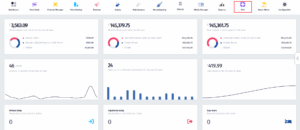
Click on the
PoS
icon.
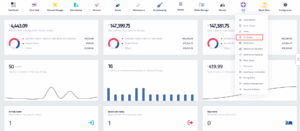
Once the dropdown menu appears, click on
Purcahses
.
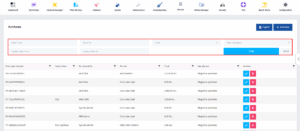
You can filter the purchase list by date range or item category using the fields at the top, and then click the “Filter” button to apply your criteria.
How to make a purchase in Spoonbill PoS.
How to edit your PoS in Spoonbill PMS.
Powered by
BetterDocs
Transforming Hospitality
Zgjidhjet Spoonbill
Spoonbill PMS
Spoonbill PoS
Menaxhimi i Eventeve
Menaxhimi i Plazhit
Menaxhimi i Burimeve Njerëzore
Linqe të shpejta
Kreu
Qëndra e Mbështetjes
Na kontaktoni
Le të lidhemi
Facebook-f
Instagram
Youtube
© 2025 Spoonbill PMS. Powered by
Elite Travel Group