Kreu
Rreth Nesh
Spoonbill
Menaxhimi i Hotelit
Menaxhimi i Bar-Restorantit
Menaxhimi i Eventeve
Menaxhimi i Plazhit
Spoonbill HR
Spoonbill CRM – Sistem Menaxhimi i Dërgesave dhe Logjistikës.
Qëndra e Mbështetjes
Na kontaktoni
Blogu
Menu
Kreu
Rreth Nesh
Spoonbill
Menaxhimi i Hotelit
Menaxhimi i Bar-Restorantit
Menaxhimi i Eventeve
Menaxhimi i Plazhit
Spoonbill HR
Spoonbill CRM – Sistem Menaxhimi i Dërgesave dhe Logjistikës.
Qëndra e Mbështetjes
Na kontaktoni
Blogu
Apply
View Categories
Home
Docs
Point of Sales
How to create an item category in Spoonbill PoS.
How to create an item category in Spoonbill PoS.
< 1 min read
Listen
0:00
/
0:18
1×
Copy page
Copy page
Copy this page as Markdown for LLMs
View as Markdown
Open this page as plain Markdown
(opens in a new tab)
Open in ChatGPT
Ask questions about this page
(opens in a new tab)
Open in Claude
Ask questions about this page
(opens in a new tab)
Open in Google AI Studio
Ask questions about this page (Google account required)
(opens in a new tab)
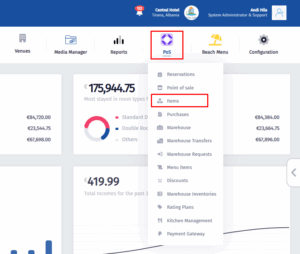
Click on the
PoS Icon
, after the menu pops up click on
Items
.
Click on
Item Categories
.
Click on
Add New
.
Fill in the information and click on
Update
.
How to filter reservations in Spoonbill PoS.
How to create an item in Spoonbill PoS.
Powered by
BetterDocs
Transforming Hospitality
Zgjidhjet Spoonbill
Spoonbill PMS
Spoonbill PoS
Menaxhimi i Eventeve
Menaxhimi i Plazhit
Menaxhimi i Burimeve Njerëzore
Linqe të shpejta
Kreu
Qëndra e Mbështetjes
Na kontaktoni
Le të lidhemi
Facebook-f
Instagram
Youtube
© 2025 Spoonbill PMS. Powered by
Elite Travel Group